


Why are so many businesses rethinking their ERP strategy—and why is the cloud at the center of that shift? The answer is simple: traditional, on-premise ERP systems are struggling to keep up with the speed, scale, and flexibility modern businesses demand. As organizations expand, adopt digital-first models, and operate across multiple locations, they need systems that deliver real-time visibility, faster decision-making, and seamless collaboration—without heavy infrastructure overheads.
This shift is clearly reflected in market growth. The global cloud ERP market is expanding at a rapid pace, growing from roughly $48–$87 billion in 2024 and projected to cross $170 billion between 2029 and 2032, fueled by a strong 14.5%–17.5% CAGR. Today, more than half of all organizations already rely on cloud-based ERP systems, driven by digital transformation initiatives, AI-powered automation, improved operational efficiency, and significantly lower total cost of ownership.
Beyond adoption rates, the business impact of Cloud ERP is equally compelling. Studies show that Cloud ERP implementations deliver a median ROI of 52%, with most organizations achieving payback within 24 to 36 months. Faster deployments, automatic upgrades, reduced IT dependency, and real-time insights all contribute to quicker time-to-value—making Cloud ERP not just a technology upgrade, but a strategic investment.
This is where modern platforms like Deskera ERP stand out. Deskera offers a fully cloud-based ERP solution that unifies accounting, inventory, manufacturing, payroll, and CRM on a single platform. With built-in automation, AI-powered insights, and mobile accessibility, Deskera helps growing businesses simplify operations, scale faster, and make data-driven decisions—without the complexity of traditional ERP systems.
What Is Cloud ERP?
Cloud ERP (Enterprise Resource Planning) is ERP software delivered over the internet, giving businesses access to their mission-critical applications anytime and from anywhere. Often described as the digital backbone—or the “brains”—of an organization, Cloud ERP supports core business processes such as finance, inventory, operations, manufacturing, HR, and sales through a single, centralized system. Its cloud-based nature enables near-unlimited scalability, faster innovation, and real-time access to data across teams and locations.
Most Cloud ERP solutions are hosted on a provider’s cloud computing platform and delivered as Software as a Service (SaaS). Instead of owning the software and infrastructure, businesses subscribe on a monthly or annual basis. This model eliminates upfront hardware costs and shifts the responsibility for system maintenance, updates, security, and data storage to the ERP vendor. As a result, organizations can focus less on IT upkeep and more on strategic growth initiatives.
Cloud-based ERP systems generally fall into two categories: private cloud ERP and SaaS ERP. In a private cloud setup, a company retains its hardware and software on-site while running ERP in a cloud-like environment. While this offers greater control, it often comes with higher initial costs, ongoing maintenance responsibilities, and limited remote access without third-party tools. In contrast, SaaS-based Cloud ERP allows users to log in from any device with a web browser, making it far more accessible and cost-effective.
This “anytime, anywhere” accessibility is a major advantage for businesses with remote teams, field staff, or multiple locations. With real-time visibility into operations and a single source of truth for business data, teams can make faster, more informed decisions. By centralizing processes and offloading technical complexity to a trusted ERP provider, Cloud ERP helps organizations stay agile, competitive, and ready to scale in an increasingly digital business environment.
How Does Cloud ERP Work?
Cloud ERP works by hosting enterprise resource planning software on secure, off-site cloud infrastructure rather than on company-owned servers.
The system is always online and accessible through the internet, allowing teams to log in, work with real-time data, and manage core business processes without worrying about hardware, system maintenance, or manual updates.
Behind the scenes, a combination of servers, storage, networks, and software—collectively known as the cloud—keeps the ERP running reliably and securely.
Cloud-Based Infrastructure and Hosting
Cloud ERP is hosted on the software vendor’s cloud computing platform, not on your internal servers. This means businesses do not need to invest in physical hardware, data centers, or complex IT infrastructure.
The ERP provider manages uptime, performance, system availability, and disaster recovery, significantly reducing the total cost of ownership compared to traditional on-premise ERP systems.
Internet-Enabled Access Across Devices
Users access Cloud ERP through a web browser or mobile app on desktops, laptops, tablets, or smartphones. As long as there is a stable internet connection, employees can securely log in from the office, home, customer sites, or remote locations. This “anytime, anywhere” access has become essential in post-COVID work environments where remote and hybrid work models are now the norm.
Centralized Applications and Real-Time Data Flow
A Cloud ERP system brings together critical business applications—such as finance, inventory, sales, supply chain, HR, and operations—into one unified platform. All data is stored centrally and updated in real time, ensuring every department works with the same, most current information. This eliminates data silos and supports faster, more informed decision-making.
Subscription-Based Usage and Scalability
Cloud ERP is typically delivered as a Software as a Service (SaaS) solution, where businesses pay a monthly or annual subscription fee. This model allows organizations to scale usage up or down based on business needs, add new users or modules easily, and avoid large upfront investments. It also gives companies the flexibility to pay only for what they use.
Built-In Security, Updates, and Backups
Security, system updates, and backups are handled by the Cloud ERP provider. This includes applying security patches, rolling out new features, and ensuring data is regularly backed up and protected against threats. While businesses must ensure proper access controls and a reliable internet connection, off-site hosting often delivers stronger security and resilience than many in-house setups.
Configurable Modules and Deployment Models
Cloud ERP solutions are highly configurable, allowing businesses to choose modules, workflows, and settings tailored to their industry and size. Some organizations opt for pure SaaS models, while others use private or hybrid cloud deployments that combine greater control with cloud flexibility. This adaptability ensures teams stay focused on the metrics, processes, and workflows that align with their business goals.
Cloud ERP vs On-Premise ERP: Key Differences
While Cloud ERP and on-premise ERP systems often deliver similar core functionalities—such as finance, inventory, operations, and reporting—the way they are deployed, managed, and scaled differs significantly. These differences directly impact cost, flexibility, performance, and long-term business agility.
As a result, many organizations are reassessing traditional ERP models, with surveys showing that 63% of businesses now prefer cloud ERP over on-premise solutions. Below are the key areas where Cloud ERP and on-premise ERP diverge.
Deployment and Infrastructure
Cloud ERP is hosted off-site on the ERP vendor’s cloud platform and accessed securely via the internet. The vendor manages servers, storage, operating systems, and data centers.
On-premise ERP, in contrast, is installed locally on company-owned hardware and servers, requiring internal IT teams or managed service providers to handle setup, monitoring, and ongoing management.
Cost Structure and Payment Model
Cloud ERP follows a subscription-based pricing model, typically billed monthly or annually. This shifts ERP spending to an operating expense and removes the need for large upfront investments.
On-premise ERP requires a significant one-time license fee, along with capital expenditure for servers, networking equipment, storage, and backup systems—resulting in a much higher total cost of ownership over time.
Maintenance, Updates, and Upgrades
With Cloud ERP, routine maintenance, security patches, and feature upgrades are automatically handled by the vendor. Businesses always run on the latest version without disruption.
On-premise ERP systems require internal resources to manage updates, often involving costly version upgrades, custom rework, and downtime during implementation.
Scalability and Flexibility
Cloud ERP offers near-instant scalability. Businesses can add users, modules, or capacity as needed, paying only for what they use.
On-premise ERP systems are far less flexible, as scaling typically requires new hardware purchases, system reconfiguration, and additional IT effort.
Accessibility and Remote Work Enablement
Cloud ERP systems are accessible from anywhere using a web browser or mobile device, making them ideal for remote teams, field staff, and multi-location operations.
On-premise ERP is usually limited to company networks, with remote access requiring additional tools or configurations that increase complexity and security risks.
Deployment Speed
Cloud ERP deployments are significantly faster since no physical infrastructure needs to be procured or installed. Many organizations go live in weeks or even days.
On-premise ERP implementations can take months—or longer—due to hardware setup, system configuration, and extensive testing.
Security and Data Management
In Cloud ERP, data security, encryption, backups, and compliance are managed by the vendor, often using enterprise-grade security standards and certifications.
While on-premise ERP gives businesses direct control over their data, it also places full responsibility for cybersecurity, backups, and disaster recovery on internal teams.
Performance and Reliability
Cloud ERP systems are built for high availability and performance, dynamically adjusting to demand spikes and offering better uptime through distributed cloud architecture.
On-premise ERP performance depends heavily on internal infrastructure and manual monitoring, making it more susceptible to slowdowns and outages.
Integration and Ecosystem
Cloud ERP solutions are designed to integrate easily with third-party applications such as CRM, e-commerce, logistics, and analytics tools through APIs.
On-premise ERP systems can integrate with other software, but often require heavy customization, increasing cost and complexity.
Long-Term Business Agility
Cloud ERP supports continuous innovation, rapid process changes, and evolving business needs without major IT overhead. On-premise ERP systems tend to be more rigid, making it harder and slower to adapt to market changes, new business models, or digital transformation initiatives.
Together, these differences explain why organizations of all sizes—not just large enterprises—are increasingly choosing Cloud ERP to reduce costs, improve accessibility, and stay agile in a fast-changing business environment.
Key Modules That Make Up a Cloud ERP System
A Cloud ERP system is built as a unified, modular platform where all business functions share a single source of truth. While financial management remains the core, organizations can activate additional modules based on operational needs, industry requirements, and growth plans. This flexibility allows businesses to scale efficiently while maintaining real-time visibility across departments.
Financials and Accounting
The foundation of any Cloud ERP system, this module manages general ledger, accounts payable and receivable, cash flow, budgeting, tax management, and financial reporting. Real-time financial data enables faster closes, better compliance, and more accurate forecasting.
Customer Relationship Management (CRM)
The CRM module manages the entire customer journey—from lead capture and opportunity tracking to order history and post-sales interactions. When tightly integrated with finance and operations, it provides a complete view of customer value and revenue performance.
Inventory Management
This module tracks inventory levels across warehouses and locations in real time. It supports reorder points, batch and serial tracking, stock valuation, and inventory optimization—helping businesses reduce carrying costs while avoiding stockouts.
Order Management
Order management oversees the full order lifecycle, including order entry, pricing, fulfillment, invoicing, and returns. Integration with inventory and finance ensures accurate orders, timely deliveries, and improved customer satisfaction.
Procurement
Procurement modules handle supplier management, purchase requisitions, approvals, purchase orders, and spend tracking. Centralized procurement improves cost control, enforces purchasing policies, and strengthens supplier relationships.
Supply Chain Management
This module provides end-to-end visibility across sourcing, production, warehousing, and distribution. It helps organizations monitor supply chain performance, manage logistics, and respond quickly to disruptions using real-time insights.
Material Requirements Planning (MRP)
MRP is essential for manufacturing-focused Cloud ERP systems. It calculates material needs based on demand forecasts, bills of materials (BOMs), and production schedules—ensuring materials are available when needed without overstocking.
Project Management
Project management modules support planning, scheduling, cost tracking, and resource allocation. They are particularly valuable for service-based and project-driven businesses that need tight control over timelines, budgets, and profitability.
Reporting, Dashboards, and Analytics
Modern Cloud ERP systems include built-in analytics tools that deliver real-time dashboards, KPI tracking, and customizable reports. These insights enable leadership teams to make faster, data-driven decisions without relying on external BI tools.
Integration and API Management
Cloud ERP platforms typically provide APIs and pre-built connectors to integrate with third-party applications such as e-commerce platforms, payment gateways, logistics providers, and industry-specific tools—ensuring seamless data flow across the business ecosystem.
Why Cloud ERP Matters for Modern Businesses
Modern businesses operate in an environment defined by rapid change, distributed teams, and rising customer expectations. Legacy systems struggle to keep pace with this reality. Cloud ERP addresses these challenges by providing a flexible, always-on platform that connects people, processes, and data—enabling organizations to operate more efficiently, scale faster, and make smarter decisions in real time.
Faster Implementation and Time to Value
Cloud ERP systems can be deployed far more quickly than traditional on-premise solutions because they do not require hardware procurement or complex infrastructure setup. This faster rollout allows businesses to start realizing value in weeks rather than months, accelerating digital transformation initiatives.
Real-Time Visibility Across the Business
By centralizing data across finance, operations, inventory, and sales, Cloud ERP provides real-time visibility into business performance. Decision-makers gain instant access to accurate, up-to-date information, enabling faster responses to market changes and operational issues.
Built for Remote and Hybrid Work
Cloud ERP supports secure access from any location and device, making it ideal for remote, hybrid, and multi-location teams. Employees can collaborate seamlessly, access critical data on the go, and maintain productivity without being tied to office-based systems.
Scalability to Support Business Growth
As businesses grow, their systems must grow with them. Cloud ERP offers near-instant scalability, allowing organizations to add users, modules, or capacity without major system changes or capital investments. This flexibility supports expansion, seasonal demand, and evolving business models.
Lower Total Cost of Ownership
With subscription-based pricing and vendor-managed infrastructure, Cloud ERP significantly reduces upfront costs and ongoing IT expenses. Businesses avoid spending on servers, maintenance, and upgrades, freeing up capital for revenue-generating activities.
Continuous Innovation and Automatic Updates
Cloud ERP platforms are continuously enhanced by vendors with new features, performance improvements, and security updates. Businesses benefit from innovation without disruptive upgrades, ensuring they always operate on the latest version of the software.
Stronger Security and Business Continuity
Reputable Cloud ERP providers invest heavily in data security, encryption, backups, and disaster recovery. This often results in stronger protection and higher system reliability than many in-house IT environments can provide on their own.
Improved Agility and Competitive Advantage
By simplifying processes, eliminating data silos, and enabling faster decision-making, Cloud ERP helps businesses respond quickly to customer needs and market shifts. This agility becomes a key competitive advantage in fast-moving, digitally driven industries.
Key Benefits of Cloud ERP
Cloud ERP delivers far more than just operational efficiency—it enables businesses to become more agile, resilient, and data-driven. By shifting ERP to the cloud, organizations gain access to modern capabilities that support growth, innovation, and long-term competitiveness.
Lower Upfront and Operational Costs
Cloud ERP eliminates the need for expensive hardware, infrastructure, and large upfront license fees. With a subscription-based pricing model, businesses can better manage cash flow while reducing ongoing IT maintenance and support costs.
Faster Deployment and Quicker ROI
Because Cloud ERP does not require on-site infrastructure setup, implementation timelines are significantly shorter. Organizations can go live faster, streamline processes sooner, and achieve a quicker return on investment compared to traditional ERP systems.
Anywhere, Anytime Access
Cloud ERP systems are accessible through web browsers and mobile devices, allowing employees to work securely from any location. This flexibility supports remote work, field operations, and multi-location teams without compromising data access or productivity.
Real-Time Data and Better Decision-Making
All business data is stored centrally and updated in real time, giving leaders a single source of truth. This enables faster, more informed decisions based on accurate insights across finance, inventory, sales, and operations.
Scalability Without Complexity
As business needs change, Cloud ERP can scale easily by adding users, modules, or capacity on demand. This eliminates the need for costly system overhauls and ensures the ERP evolves alongside the business.
Automatic Updates and Continuous Innovation
Cloud ERP vendors handle system updates, enhancements, and new feature rollouts automatically. Businesses always operate on the latest version without disruptive upgrades or additional implementation costs.
Enhanced Security and Data Protection
Leading Cloud ERP providers offer enterprise-grade security, including encryption, access controls, regular security patches, and automated backups. This often results in stronger data protection than many in-house systems can provide.
Improved Collaboration Across Teams
With shared access to real-time data, teams across departments can collaborate more effectively. Cloud ERP breaks down data silos, improves transparency, and aligns departments toward common business goals.
Business Continuity and Disaster Recovery
Cloud ERP platforms are designed with built-in redundancy and disaster recovery capabilities. In the event of system failures or disruptions, data remains protected and accessible, ensuring operational continuity.
Reduced IT Burden
By offloading infrastructure management, maintenance, and security to the ERP vendor, internal IT teams can focus on strategic initiatives rather than day-to-day system upkeep.
Common Cloud ERP Challenges and How to Overcome Them
While Cloud ERP delivers clear advantages, adoption is not without its challenges. Understanding these potential roadblocks—and how to address them proactively—helps organizations maximize value, reduce risk, and ensure a smoother transition to the cloud.
Data Migration and Data Quality Issues
Migrating data from legacy systems to a Cloud ERP can be complex, especially when historical data is inconsistent or incomplete. Poor data quality can undermine system performance and reporting accuracy.
How to overcome it: Conduct a thorough data audit before migration, clean and standardize data, and migrate only what is necessary. Working with experienced implementation partners and running parallel systems during transition can further reduce risk.
Security and Compliance Concerns
Storing business-critical data off-site often raises concerns around data privacy, regulatory compliance, and cybersecurity.
How to overcome it: Choose a Cloud ERP provider with strong security certifications, encryption standards, and compliance support. Implement role-based access controls, multi-factor authentication, and regular security reviews to strengthen internal governance.
Internet Dependency and Downtime Risks
Cloud ERP relies on a stable internet connection, and connectivity issues can disrupt access to the system.
How to overcome it: Invest in reliable internet infrastructure, backup connections, and offline contingency plans where possible. Selecting vendors with strong uptime guarantees and disaster recovery capabilities also minimizes risk.
User Adoption and Change Management
Employees accustomed to legacy systems may resist new workflows and interfaces, slowing adoption and reducing ROI.
How to overcome it: Involve users early, provide role-based training, and communicate the business benefits clearly. Phased rollouts and ongoing support help teams adapt more comfortably to the new system.
Customization Limitations
Some organizations worry that Cloud ERP solutions offer less flexibility than heavily customized on-premise systems.
How to overcome it: Focus on process standardization and configuration rather than deep customization. Choose a Cloud ERP with modular design, industry-specific features, and strong integration capabilities to meet evolving needs.
Integration with Existing Systems
Integrating Cloud ERP with legacy applications, third-party tools, or industry-specific software can be challenging.
How to overcome it: Prioritize ERP platforms with robust APIs, pre-built connectors, and proven integration frameworks. Map integration requirements early in the planning phase to avoid delays.
Cost Management Over Time
While Cloud ERP reduces upfront costs, subscription fees and add-on modules can increase expenses over time if not monitored.
How to overcome it: Regularly review usage, licenses, and module adoption. Align subscriptions with actual business needs and reassess ROI as the organization scales.
Vendor Dependence and Long-Term Commitment
Relying on a single Cloud ERP vendor may raise concerns about vendor lock-in and long-term flexibility.
How to overcome it: Evaluate vendors carefully, review SLAs, data portability options, and exit strategies. Selecting a scalable, well-supported platform reduces long-term risk.
By anticipating these challenges and addressing them strategically, businesses can unlock the full potential of Cloud ERP while ensuring a secure, scalable, and future-ready ERP environment.
Who Should Use Cloud ERP?
Cloud ERP is designed for organizations that need flexibility, real-time visibility, and scalability without the complexity of managing on-premise infrastructure. While it can support businesses of all sizes, it is particularly well suited to the following types of organizations.
Small and Medium-Sized Businesses (SMBs)
SMBs benefit from Cloud ERP’s lower upfront costs and subscription-based pricing. Without the need for in-house IT infrastructure, smaller teams can access enterprise-grade capabilities—such as accounting, inventory, and reporting—while focusing resources on growth rather than system maintenance.
Growing and Scaling Organizations
Businesses experiencing rapid growth often outgrow legacy systems quickly. Cloud ERP allows organizations to add users, modules, and functionality as needed, making it ideal for companies expanding into new markets, launching new products, or increasing operational complexity.
Manufacturing and Distribution Businesses
Manufacturers and distributors benefit from Cloud ERP modules such as inventory management, order management, supply chain management, and MRP. Real-time visibility into stock levels, production schedules, and fulfillment processes helps reduce costs, improve efficiency, and meet customer demand more effectively.
Businesses with Remote or Hybrid Workforces
Organizations with remote teams, field staff, or multiple locations need systems that are accessible from anywhere. Cloud ERP enables secure, browser-based access, allowing employees to collaborate and work productively regardless of location.
Multi-Location and Global Businesses
Cloud ERP supports centralized control with localized access, making it well suited for businesses operating across regions or countries. It enables standardized processes, consolidated reporting, and real-time insights across all locations.
Service-Based and Project-Driven Organizations
Service firms and project-based businesses benefit from Cloud ERP’s project management, financial tracking, and reporting capabilities. These features help teams manage costs, timelines, and profitability more effectively.
Businesses Undergoing Digital Transformation
Organizations modernizing their technology stack or moving away from legacy systems can use Cloud ERP as a foundation for digital transformation. Its integration capabilities, automation, and real-time analytics support data-driven decision-making and continuous improvement.
Companies Seeking IT Simplicity and Agility
Businesses that want to reduce IT overhead, eliminate manual upgrades, and avoid infrastructure management are strong candidates for Cloud ERP. Vendor-managed updates, security, and backups allow internal teams to focus on strategic initiatives rather than system upkeep.
Cloud ERP is ultimately best suited for organizations that value agility, scalability, and real-time insights—and want an ERP system that evolves alongside their business.
How to Choose the Right Cloud ERP Solution
Selecting the right Cloud ERP solution is a strategic decision that impacts every part of the business. With many vendors offering similar features, the key is to evaluate how well the platform aligns with your operational needs, growth plans, and long-term digital strategy. The following factors can help guide a confident and informed choice.
Define Your Business Requirements
Start by identifying the core processes you need the ERP to support—such as finance, inventory, manufacturing, or supply chain operations. Involve stakeholders from different departments to ensure the system addresses real operational challenges and not just technical requirements.
Evaluate Deployment and Scalability
Look for a Cloud ERP solution that can scale easily as your business grows. The platform should allow you to add users, modules, and functionality without major disruptions or costly system changes.
Assess Industry Fit and Functionality
Not all ERP systems are built the same. Choose a solution with features and workflows designed for your industry, whether manufacturing, distribution, services, or retail. Industry-specific functionality reduces the need for heavy customization.
Review Integration Capabilities
Your Cloud ERP should integrate seamlessly with existing tools such as CRM, e-commerce platforms, payment gateways, and analytics solutions. Strong APIs and pre-built connectors are essential for smooth data flow and future flexibility.
Understand the Total Cost of Ownership
Beyond subscription fees, consider implementation costs, training, customization, and long-term scaling expenses. A transparent pricing model helps avoid surprises and ensures the solution delivers strong ROI over time.
Prioritize Security and Compliance
Data protection is critical. Evaluate the vendor’s security standards, certifications, encryption practices, backup policies, and compliance support. Ensure the platform meets regulatory requirements relevant to your business and region.
Evaluate Usability and User Adoption
An intuitive interface and role-based dashboards make a significant difference in adoption rates. Choose a system that is easy to use, supports mobile access, and minimizes the learning curve for employees.
Assess Vendor Reliability and Support
The ERP vendor should offer reliable customer support, clear service-level agreements (SLAs), and a strong product roadmap. Consider the vendor’s track record, financial stability, and commitment to continuous innovation.
Plan for Implementation and Change Management
Successful ERP adoption depends on more than software. Evaluate the vendor’s implementation approach, onboarding support, and training resources. A phased rollout and ongoing support can reduce disruption and improve outcomes.
Consider Long-Term Flexibility
Choose a Cloud ERP solution that can adapt to future business models, technologies, and market changes. Flexibility, regular updates, and extensibility ensure the ERP remains relevant as your organization evolves.
By carefully assessing these factors, businesses can select a Cloud ERP solution that not only meets today’s needs but also supports sustainable growth and long-term success.
How Deskera ERP Supports Cloud-First Businesses
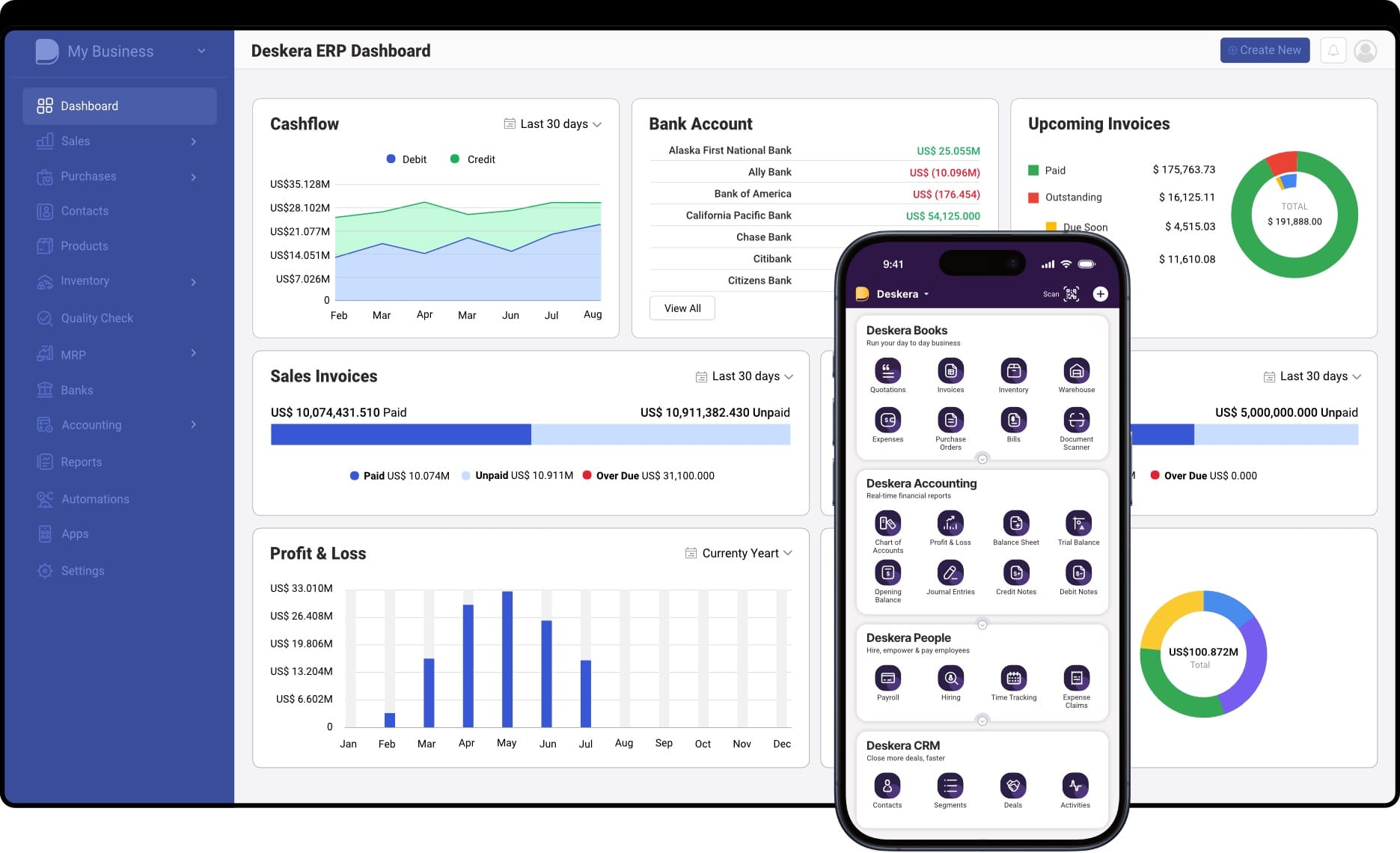
Deskera ERP is designed to be a comprehensive, cloud-native solution that helps modern businesses streamline operations, boost efficiency, and scale without the constraints of traditional on-premise systems. Built on a unified platform, Deskera connects core business functions—such as finance, inventory, sales, and operations—while providing real-time insights and automated workflows tailored to dynamic business needs.
Unified Cloud Platform for End-to-End Operations
Deskera ERP brings all essential business modules onto a single cloud platform, eliminating data silos and ensuring consistency across departments. From accounting and reporting to inventory, order management, and procurement, every function works off a centralized data source, enabling better coordination and faster decision-making.
Real-Time Visibility and Reporting
With built-in analytics and customizable dashboards, Deskera provides real-time visibility into key metrics such as cash flow, sales performance, inventory levels, and project profitability. Decision-makers can access accurate insights anytime, empowering them to respond quickly to market changes and operational challenges.
Scalability That Grows With Your Business
As a cloud-first solution, Deskera ERP makes it easy to scale operations without costly infrastructure investments. Businesses can add users, enable additional modules, or expand to new regions seamlessly. This flexibility empowers organizations to adapt quickly to evolving needs and growth opportunities.
Automation and Workflow Efficiency
Deskera automates repetitive tasks—such as invoicing, bank reconciliation, purchase order generation, and stock updates—freeing up teams to focus on strategic work. Automated alerts and workflows help reduce errors, improve compliance, and enhance overall productivity.
Mobile and Remote Accessibility
Because Deskera operates on a secure cloud platform, users can access critical business data and functionality from any device with an internet connection. This makes it ideal for remote teams, field sales staff, and multi-location businesses that require secure, on-the-go access to ERP tools.
Integration and Extensibility
Deskera supports integration with third-party applications, enabling data flow between the ERP and other business systems such as CRM tools, e-commerce platforms, payment gateways, and more. Strong API support and adaptable modules ensure the solution can plug into diverse tech ecosystems.
Strong Security, Compliance, and Reliability
Deskera leverages robust cloud infrastructure with enterprise-grade security features such as encryption, access control, automated backups, and disaster recovery. These capabilities help protect sensitive data while ensuring regulatory compliance and business continuity.
Continuous Innovation and Support
With Deskera ERP, updates and new features are delivered automatically, eliminating manual upgrade cycles and downtime. Businesses benefit from continuous innovation, expanded capabilities, and ongoing support—without the burden of managing infrastructure or software maintenance.
Key Takeaways
- Cloud ERP delivers enterprise resource planning software over the internet, providing centralized access to critical business processes with real-time data and scalability.
- Cloud ERP works by connecting core business modules through cloud infrastructure, enabling secure, anytime-anywhere access, automation, and integration across teams and devices.
- Unlike on-premise ERP, Cloud ERP is hosted and managed by vendors, offering lower upfront costs, faster deployment, easier scalability, and continuous updates.
- Cloud ERP consists of modular components such as financials, CRM, inventory, order management, procurement, supply chain management, MRP, project management, and analytics, allowing businesses to implement what they need.
- Cloud ERP supports agility, real-time decision-making, remote work, and growth by providing centralized processes, scalability, and reduced IT overhead.
- Businesses benefit from lower costs, faster ROI, real-time insights, improved collaboration, automatic updates, stronger security, and seamless scalability.
- Successful adoption requires addressing challenges like data migration, security, user adoption, customization limits, and integrations through planning, training, and reliable vendor support.
- Cloud ERP is ideal for SMBs, growing businesses, manufacturers, distributors, remote or multi-location teams, project-driven organizations, and companies undergoing digital transformation.
- Selecting the right ERP involves evaluating business requirements, industry fit, scalability, integration capabilities, cost, security, usability, vendor reliability, and long-term flexibility.
- Deskera ERP empowers cloud-first businesses with a unified platform, real-time analytics, scalable modules, automated workflows, mobile access, strong security, integration options, and continuous innovation.
Related Articles
 Niti Samani
 Niti Samani
 Niti Samani
 Niti Samani
 Niti Samani
 Niti Samani